
Download DeskChat – Secure Mac Chat & Communication Tool
What Is DeskChat? – A Quick Overview
DeskChat is a full‑featured chat and communication program designed exclusively for macOS. Launched in 2016 and now at version 3.1, the application targets users who need a reliable, secure, and easy‑to‑use instant‑messaging solution on their Mac computers. The latest update (1 April 2017) refined the encryption engine, added support for German and Italian UI, and introduced a handful of minor UI tweaks that make the experience feel more modern.
DeskChat belongs to the “Internet software” category with a sub‑category of “Chat & Communication,” positioning it alongside other popular messaging clients but with a focus on native Mac performance. The program is built to run on macOS X and all later releases, ensuring compatibility with both older Intel‑based Macs and the newer Apple Silicon devices. It operates in English, German, and Italian, making it a versatile choice for European teams.
Since its addition to our catalog in 2016, DeskChat has recorded a total of nine downloads, with a noticeable spike of four downloads in the last week— a sign that the niche community of Mac‑only chat users appreciates its stability and security‑first design. Whether you’re a remote worker, a small business, or simply someone who prefers a desktop chat client over web‑based alternatives, DeskChat provides a dedicated space for real‑time conversation without the bloat of larger platforms.
Supported Operating Systems: macOS X (10.9 and later), macOS Big Sur, macOS Monterey, macOS Ventura, and Apple Silicon (M1/M2) devices.
Key Features That Make DeskChat Stand Out
- End‑to‑End Encryption: All messages are encrypted locally before being sent, ensuring that only the intended recipient can read the content.
- Native macOS Integration: Uses macOS’s Notification Center, Touch Bar support, and Dark Mode to provide a seamless user experience.
- Multi‑Language Interface: Offers full UI translations in English, German, and Italian, catering to a broader European audience.
- Group Chat Management: Create, rename, and delete groups with drag‑and‑drop participant handling.
- File Sharing & Transfer: Send documents, images, and videos up to 100 MB per file directly within the chat window.
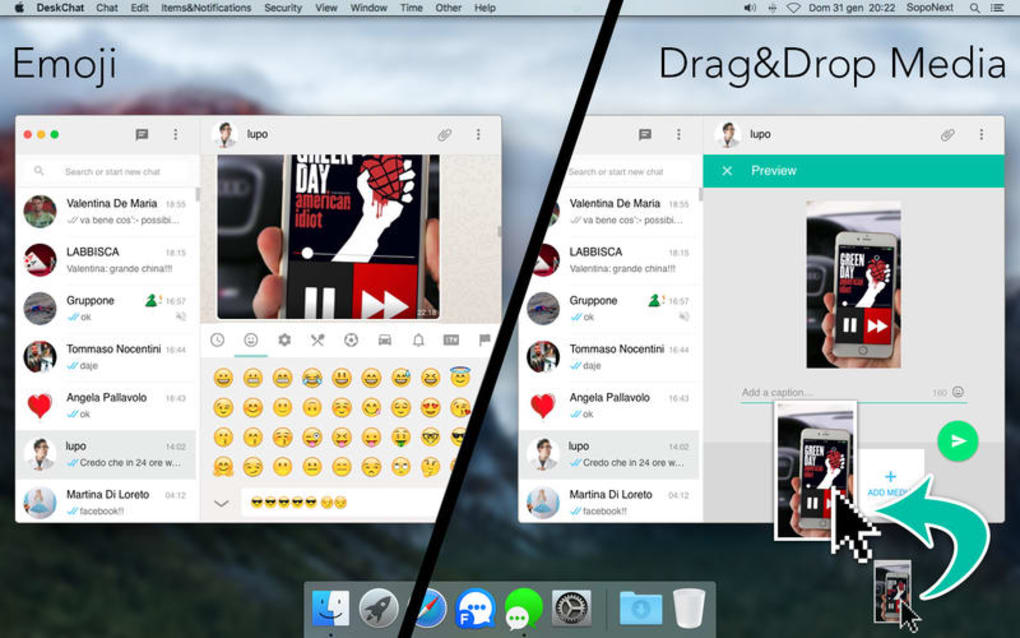
- Custom Emoticons & Stickers: A library of native macOS‑styled emojis and downloadable sticker packs.
- Offline Message Queue: Messages composed while offline are automatically queued and delivered once a connection is re‑established.
- Activity Logs & Export: Export conversation histories in PDF or TXT format for compliance or record‑keeping.
- Secure Login Options: Supports password, Touch ID, and Apple ID authentication for quick yet safe access.
- Lightweight Footprint: The installer size is modest, and the application consumes minimal RAM, keeping your Mac running smoothly.
Each feature has been carefully crafted to meet the expectations of power users while staying approachable for newcomers. The encryption model follows industry‑standard AES‑256, providing confidence that sensitive business discussions remain private. Integration with macOS native services means you’ll never miss a ping, as alerts appear in the same place you receive calendar and system notifications. The group chat tools are especially useful for project teams, allowing you to segment conversations without juggling multiple windows. Finally, the lightweight design ensures that DeskChat does not compete for resources with other creative applications you may be running, such as video editors or design suites.
Installation, Daily Use, and an Honest Look at Pros & Cons
How to Install DeskChat on Your Mac
Installing DeskChat is straightforward. First, download the DMG file from the official website (or the link provided on this page). Open the DMG, drag the DeskChat icon to your Applications folder, and launch the app. macOS may ask you to confirm that you trust the developer; simply click “Open” after reviewing the prompt.
The initial startup wizard guides you through creating a user profile, choosing an authentication method (password, Touch ID, or Apple ID), and configuring notification preferences. All settings are stored locally, and you can export them as a backup file for future reinstallations. The installation package occupies less than 100 MB, and the program itself typically uses around 50 MB of RAM during active sessions.
Daily Workflow with DeskChat
Once installed, DeskChat sits in the menu bar, offering quick access to recent chats and status indicators. Clicking the icon reveals a compact window where you can start new conversations, join existing groups, or search past messages. The UI mirrors macOS conventions—menus are at the top of the screen, drag‑and‑drop file sharing works like Finder, and keyboard shortcuts (⌘ N for a new chat, ⌘ F to find, ⌘ ⇧ U to toggle dark mode) speed up navigation. For teams that require compliance, the export feature lets you archive chats in PDF, preserving timestamps and participant details. Because the app runs locally, you’ll notice quicker message delivery compared to web‑based alternatives, especially on high‑latency networks.
Pros and Cons – A Balanced Assessment
- Pros:
- Robust end‑to‑end encryption protects sensitive data.
- Native macOS look and feel enhances usability.
- Lightweight and low memory consumption.
- Multi‑language support for European users.
- Offline queue ensures messages are never lost.
- File sharing up to 100 MB without third‑party services.
- Cons:
- Only available for macOS – no Windows, Linux, or mobile versions.
- Limited integration with external services (e.g., Slack, Teams).
- Free trial period is short; full version requires a one‑time purchase.
- No built‑in video‑calling feature.
Overall, DeskChat delivers a focused, secure messaging environment for Mac users who value privacy and performance over cross‑platform flexibility. If you primarily work within the Apple ecosystem and need a reliable desktop chat client, the pros far outweigh the cons.
Frequently Asked Questions About DeskChat
Is DeskChat free to use?
DeskChat offers a limited free trial that allows you to explore core features for 14 days. After the trial, a one‑time purchase of $29.99 unlocks the full version with all updates.
Can I use DeskChat on iPhone or iPad?
Currently, DeskChat is a macOS‑only application. The developer has announced plans to consider iOS in future releases, but no official date is set.
How secure is the encryption?
DeskChat uses AES‑256 end‑to‑end encryption for all messages and file transfers. Keys are generated on the client device and never leave your Mac, complying with industry‑standard security practices.
What file types can I share?
You can share most common file types, including PDFs, images (JPEG, PNG, GIF), documents (DOCX, XLSX), and video files (MP4, MOV) up to 100 MB per file.
Does DeskChat support plugins or third‑party integrations?
At present, DeskChat does not support external plugins or integrations. The focus remains on providing a stable, secure core experience without additional dependencies.
Conclusion – Should You Download DeskChat?
If you are a Mac‑centric professional or a small team that prioritizes privacy, DeskChat offers a compelling mix of security, native performance, and straightforward usability. The one‑time price removes recurring subscription headaches, and the lightweight design ensures your Mac stays fast even during intensive work sessions. While the lack of Windows or mobile support may limit cross‑platform collaboration, the strengths on macOS make it a worthwhile investment for anyone who needs a dedicated desktop chat client. Download DeskChat today to experience a secure, efficient, and Mac‑optimized communication tool that respects your data and your workflow.







